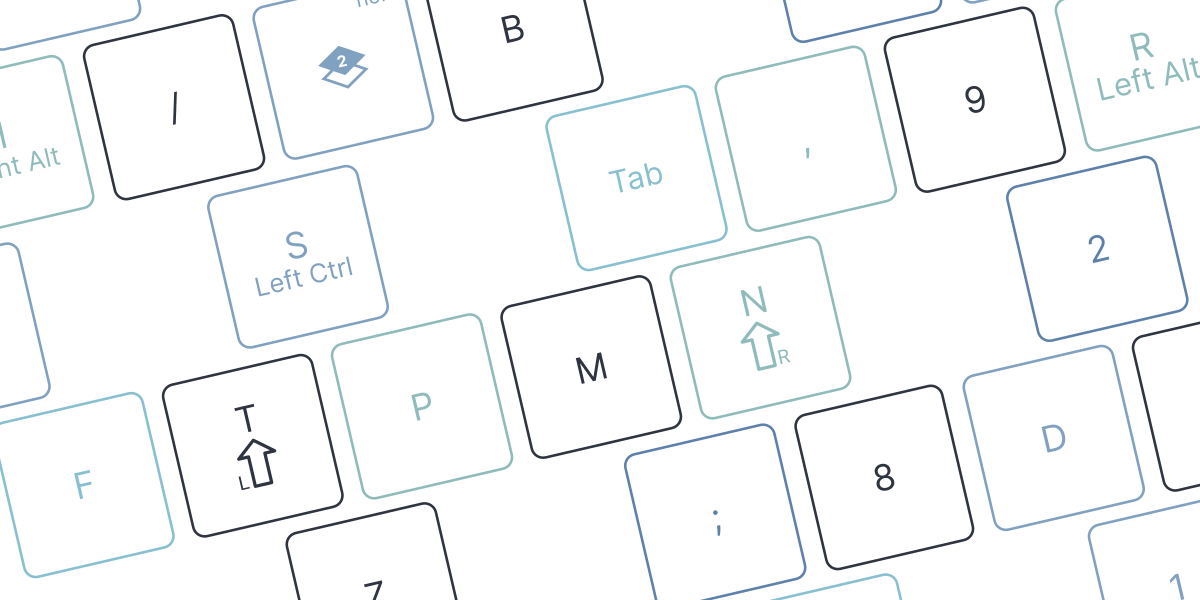
A Failed Attempt at Adopting Colemak and Home Row Modifiers on the Voyager
Published: 2025/1/4
The Motive
Earlier this year in January I purchased a new Voyager from ZSA for work. Featuring a minimal, 52-key layout with great customization options, it seemed to fit most of my requirements. Most importantly, the small frame made it easy to pack and carry around, allowing me to commute with the board to and from work. I could have played it safe and purchased another Erogdox EZ to match the one at home. Not to mention I could have done preliminary research before making a massive commitment towards an unfamiliar layout. I ignored both options and chased the feeling of being part of an ‘elite’ group with exotic keyboards and constrained key counts.
This purchase triggered my deep dive into the keyboard layout rabbit hole. What caught my eye the most was the Colemak layout and Home Row Modifiers. Both triggered an odd tinge of FOMO. Could this help optimize my setup? Am I missing out on productivity without them? I know it’s best to ignore this feeling, but it is in my nature to chase optimization and exclusivity.
By February I fully committed to using Colemak-Dh-Jk and Home Row Modifiers on my Voyager.
A Constraint
Adoption was partly difficult due to my stubborn approach towards configuration. I consider any customization as a liability that can go stale or break in the future. If I plan on heavy customization, I try to keep it contained in one spot.
To stay consistent with this rule I convinced myself that for a ‘clean’ setup, all configuration must be done on the keyboard side. The apps I use shouldn’t adhere to the keyboard layout. In other words, the layout must not rely on apps to be installed or configured a certain way. When I plug my keyboard into a computer, I expect it to work instantly without requiring additional changes in the settings.
Layout Overview
This was my endgame layout after a few months of adjustment:
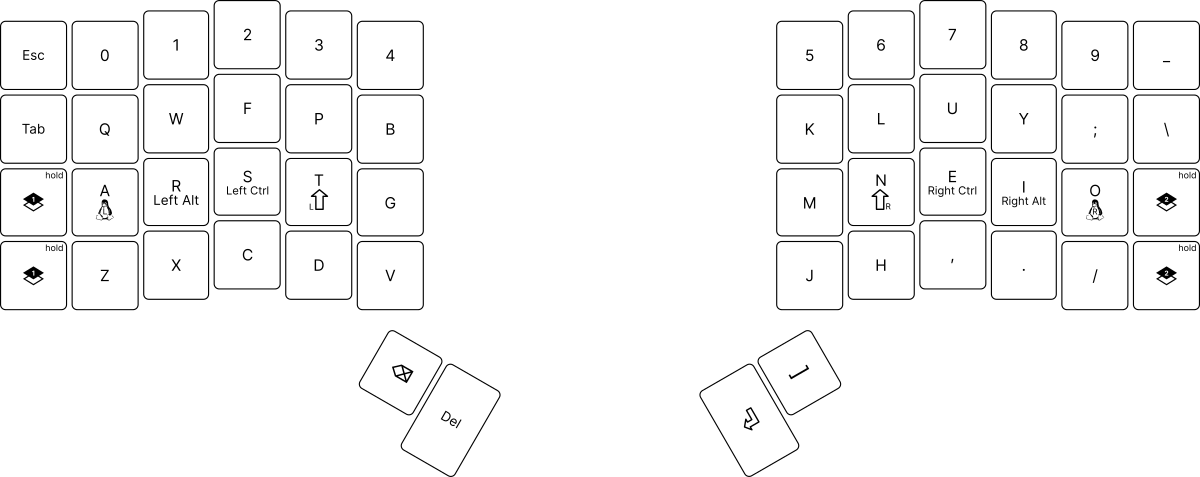
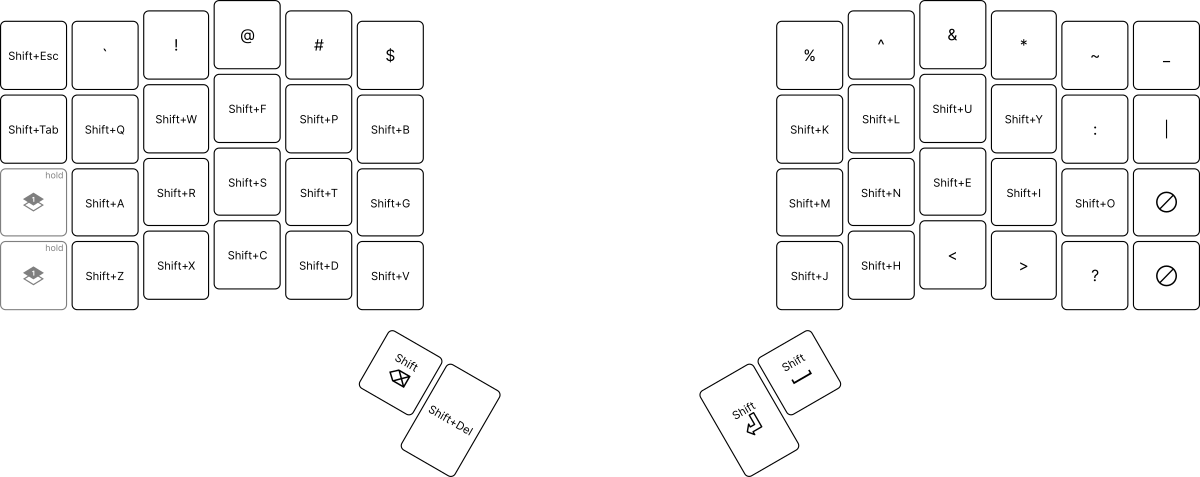
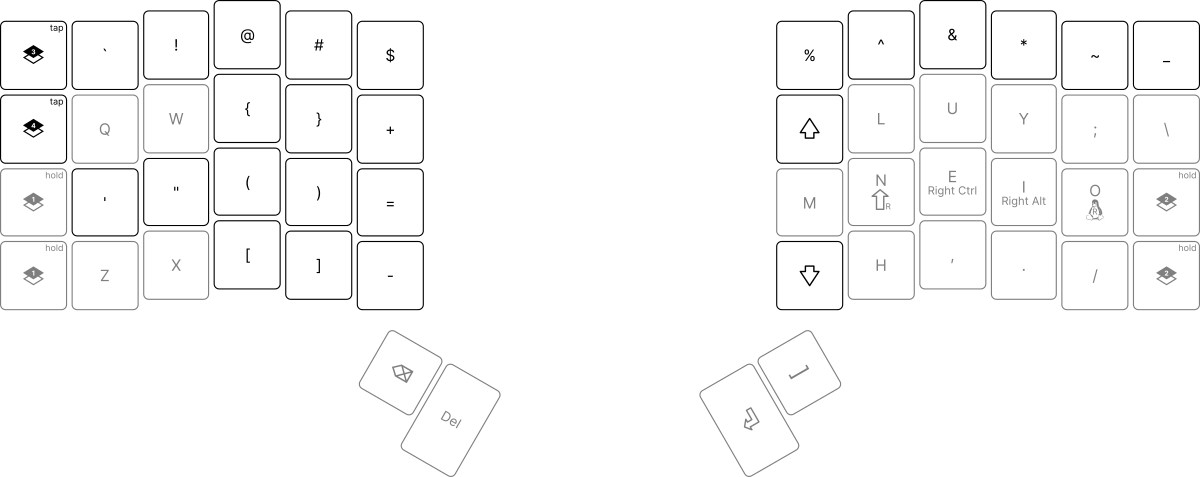
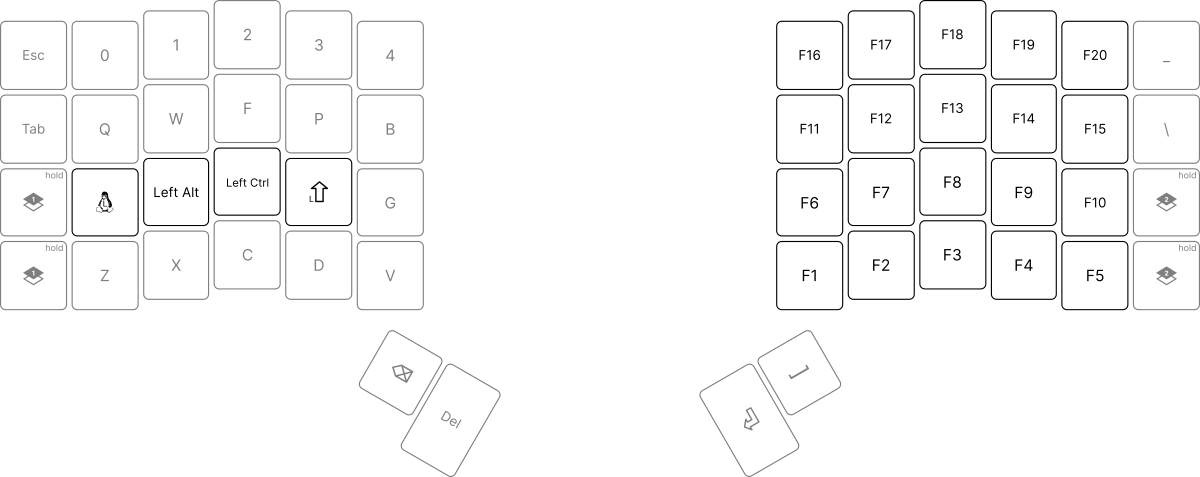
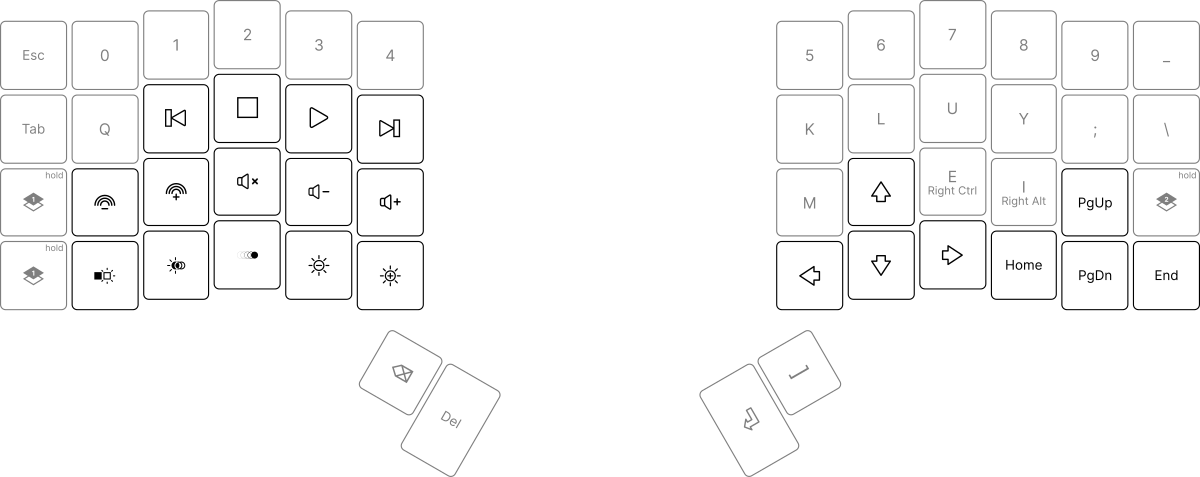
Colemak-Dh-Jk
Colemak is a keyboard layout considered to be an optimal alternative to the ubiquitous Qwerty. The main advantage of Colemak is that the most frequently used keys are placed on the home row where they are easily accessible. Colemak-Dh is similar but with some small improvements, namely the modifications of the D and H key. I made one more adjustment and landed on Colemak-Dh-Jk, which is just like Colemak-Dh but with the J and K keys flipped.
The initial few weeks with the layout were painful. My words per minute (WPM) dropped considerably and I struggled with words and tasks that I crushed with Qwerty. The whole experience felt like moving and thinking with 800-ping. Even typing for a few minutes would give me a small migraine. Despite the struggle I did notice that my fingers traveled less and stayed near the home row. This was enough proof for me to believe that the layout did have some merit to it, and that I was on the right path to achieving massive productivity gains.
Unfortunately, after ~10 months of use, the setup still felt heavily awkward. My fingers wouldn’t flow in the same way that they used to with Qwerty. I still only averaged around 70-90 WPM on typing tests and was probably slower when writing emails or coding. This feels especially bad in comparison to the 100-120 WPM I averaged doing anything with Qwerty.
I can’t really put my finger on why exactly the adoption failed, but there were definitely some annoying walls I kept running into.
Weakass Right Pinky
One of the more irritating issues for me was my right pinky. With Qwerty the finger was only in charge of the semicolon and nothing else. It moved very infrequently compared to the other fingers even during coding. With Colemak it struggled to keep up the responsibility of the O key. Some common issues:
- Failure to double tap O in the middle of the word. I typed words like “brook, cookie, cartoon” as “brok, cokie, carton”.
- Delayed O input when rolling fingers. It was difficult for me to reliably type “-tion” and “-sion” and would type “-tino” and “-sino” instead.
These typos don’t happen very frequently, but they are definitely persistent and hard to ignore. It was especially discouraging given that the mistakes continued to occur even after months of practice.
Failure to Commit Everything
Even with the mobility of the Voyager, I still occasionally found myself typing on my home and work laptop keyboards. This was an issue because of my stubborn ‘configuration only on the keyboard’ constraint. I convinced myself that having to configure Colemak-Dh-Jk on both of my laptops (Windows and Mac) would cause more problem down the line. The only possible logical outcome in my mind was to retain the Qwerty layout on my work and home laptops.
This sounds very counterintuitive but it was actually not as self-sabotaging as it sounds. I was somehow able to keep Qwerty muscle memory on my laptops while developing my Colemak-Dh-Jk skills on the Voyager. In the same way a musician is able to play multiple instruments I think my brain partitioned itself to treat laptop keyboards and the Voyager as separate instruments. At a certain point I could type in both Qwerty and Colemak-Dh-Jk at 70 WPM within minutes of each other. Practically useless, but a cool party trick for the 15 other Colemak users out there.
While it was cool that I could use both layouts, double-dipping was pretty dumb and most likely hindered my adoption to some extent. Sure, my brain was able to allocate space for both scenarios, but it would be a whole lot easier if I only had to keep track of one layout. If I were to attempt a layout shift again in the future, I’d have to make sure that my laptop usage is at an absolute minimum.
HJKL on Vim
Getting used to most Vim bindings was certainly arduous, but doable for the most part. Getting used to Vim HJKL navigation however was near impossible.
When I first started configuring my keyboard, I immediately knew that getting natural HJKL navigation would prove to be a challenge. After some testing and tinkering I came down to a few options.
- Map HJKL to MNEI on all my Vim configurations.
- Make a new layer on the Voyager that changes the MNEI keys to Left Down Up Right keys respectively.
- Just suck it up and use the HJKL keys as is on the Colemak layout.
If you are familiar with this topic then you can probably recognize that options 1 and 2 make the most sense. And you would be right. I considered the options but couldn’t find a way to get them to work.
Right off the bat option 1 breaks my low-configuration constraint. I did consider making an exception and breaking the rule but quickly refrained from pursuing the option. The main reason being that I use too many apps that require remapping. Not only would I have to configure Vim, but also my IdeaVim, Vimium, lf, sxhkd, bottom, lazygit, lazydocker, Obsidian, and even SheetKeys key bindings (there are probably more that I am forgetting). All of these are points of failure and might hit some edge cases that make it difficult to adapt.
I tried option 2 for a little bit but couldn’t get it to work. Part of it was because the timing was awkward. Everytime I wanted to navigate around my code I would have to press and hold another key before hitting the arrow keys. The whole experience felt very awkward, especially given how often I switch between navigation and typing. Another point of contention was the limited keyspace on the Voyager. There wasn’t a really good place to map it on. I already liked the way Space, Enter, Delete, and Backspace felt on the thumbkeys so I didn’t want to put it there. Sure, I could overload one of the keys and make it switch on hold, but that just made the timing worse.
I settled for option 3 in hopes that my fingers would eventually get used to the positions. I even switched the JK keys to make it easier. Unfortunately, after 12 months I can confidently say that it never got easier. The positioning never felt natural and is just inherently slower given that my pointer finger is the only finger pressing the keys. Overall a dumb experience.
Home Row Modifiers
Home row modifiers enable users to press shift/ctrl/alt/mod keys while keeping their fingers on the home row. On paper, this makes it easier for people to trigger keyboard shortcuts without straining their fingers too much. This was attractive to me considering how frequently I use shortcuts. On a normal keyboard combinations like Shift+Ctrl+Alt+N or Shift+Mod+Num require that my fingers contort themselves to hit all keys. With home row modifiers my fingers can stay in the same row.
To get this to work on my Voyager I set my home row keys to trigger a letter input on tap and a modifier on hold. As an example, if I press and release my N key within 200 milliseconds then it outputs ‘N’. If I hold it for longer then it treats it as a shift key press. This is known as ‘key overloading’ and is often used by keyboard enthusiasts that aim to reduce their key count.
I would say that my general experience with home row modifiers itself is positive. While there is a learning curve at first, the sensation of holding modifier combinations feels amazing and definitely makes it worth it. Where I used to make Naruto-esque hand signs for changing workspaces (Shift+Mod+Num) or searching symbols (Shift+Ctrl+Alt+N) I can now keep my fingers at home and unstrained.
On the other hand, my experience with home row modifiers with key overloading was negative. Outside of keybindings, trying to type normally with the threat of holding a key down for too long is horrible. Often I would accidentally hold the O key for too long and trigger Mod+Key or sometimes Mod+Shift+Key which could trigger anything from pasting what I have in my clipboard to closing the window I was using. On the flip side there were times where I failed to hold the modifier for long enough and type out gibberish like ‘nei’ in the middle of my sentence. I really hoped that my fingers would get used to the timing but that never happened.
The Voyager
Despite my experiences, I still think highly of the Voyager. I like how I can get the advantages of a mechanical keyboard in a small form factor that makes it easy to commute with. I also appreciate how it can support complex keyboard configurations while also staying accessible to new users. That being said I wouldn’t casually recommend this to people, especially if they are new to mechanical keyboards.
For my use case, the Voyager just had too few keys and made it difficult to reach a layout that I felt comfortable with. No matter what I tried I kept running into requiring key overloading, which is something that I wanted to avoid. Commuting to and from work with the keyboard also gets overbearing at a certain point.
Closing Thoughts
To put it bluntly, I regret trying this keyboard setup, especially Colemak-Dh-Jk. My productivity took a massive hit and I don’t feel like I gained any worthwhile knowledge in return. In retrospect, I don’t even know if a 10-20 WPM boost would be worth the initial productivity loss. There are other people out there that can consistently type 140 WPM on Qwerty while I maxed out at 120 WPM. If I wanted to improve my productivity I could have just practiced with Qwerty rather than trying out an entirely different keyboard layout. Another classic case of premature optimization for me.
After a year of wrestling with the setup, I am quitting Colemak-Dh-Jk and the Voyager and going back to Qwerty and ErgodoxEZ. Sure, I could have dedicated more time to adopting it, but at this point I’m not sure if it’s worth it. The time I spent developing Qwerty muscle memory through coding, writing essays, and flaming people in LoL would require too much effort for my brain to overwrite.
One thing I am keeping is the home row modifiers. The Ergodox EZ has enough keys to support a separate layer dedicated to home row modifiers. This lets me reap the benefits of home row modifiers while also avoiding typing conflicts.
What’s funny is that this is an inevitability in my timeline. As I mentioned, I have a strong itch to try out niche and elite-feeling productivity boosters. The moment I heard how non-Qwerty layouts offer optimized key positioning, it was over. I don’t think I could dissuade my younger self if I wanted to. While I fear that this experience will cripple my typing productivity in the long term, I can happily say that my itch to use a separate keyboard layout is subdued. I can only hope that it doesn’t resurface in the future.